SMS Messaging and Consent
Last Updated: May 30, 2026
This page explains how Project Milan uses SMS messaging and how you can manage your consent.
How Users Opt In (Visual Flow)
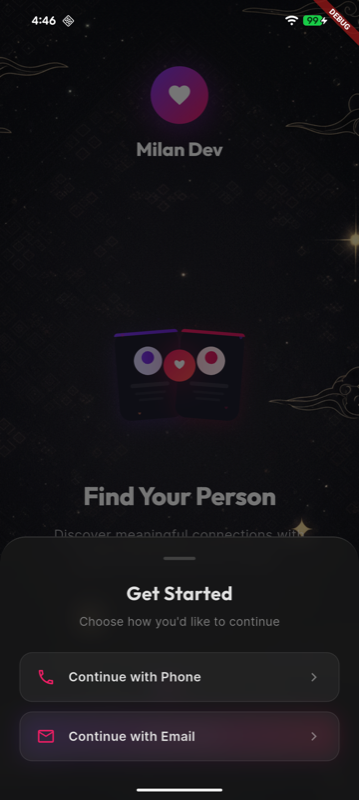
1. Choose to continue with phone
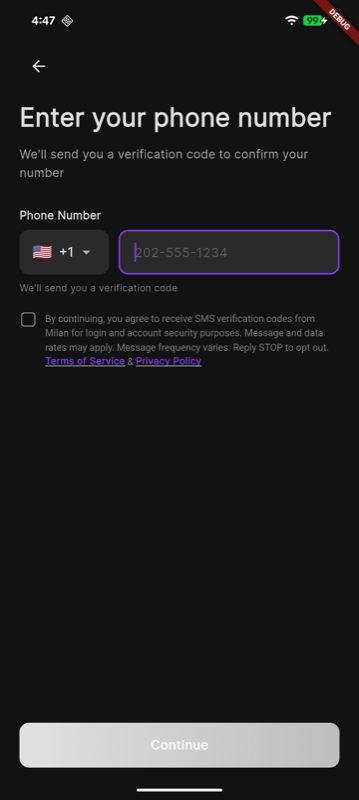
2. Enter phone number and confirm consent
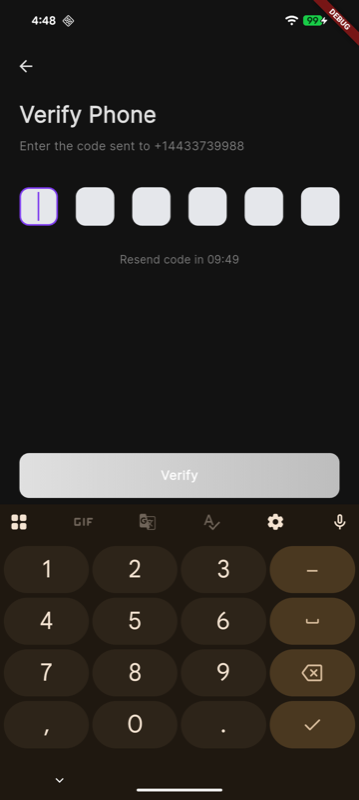
3. Enter verification code from SMS
How Users Opt In
Users opt in inside the Milan mobile app during signup. They enter their phone number and must check an unchecked consent checkbox before requesting a verification code. The checkbox text displayed in-app is: "By continuing, you agree to receive SMS verification codes from Milan for login and account security purposes. Message and data rates may apply. Message frequency varies. Reply STOP to opt out. Terms of Service & Privacy Policy." After consent, the user taps "Continue" and receives an OTP SMS.
How We Use SMS
We use SMS strictly for authentication and account security purposes. No mobile information will be shared with third parties or affiliates for marketing or promotional purposes.
Example SMS Message
"Your Milan verification code is 123456. This code will expire in 10 minutes."
Opt-Out
Users may opt out at any time by replying STOP to any SMS message. After opting out, no further SMS messages will be sent unless the user re-enables SMS by re-verifying their phone number in the app.
Help
Users may reply HELP to any SMS message to receive support contact information. You can also reach us at support@projectmilan.net for assistance.